

Ep #23: Inside DynamoDB — Part 3: Mastering the Foundations & Single-Table Principles
A Practical Deep Dive into Tables, Keys, Data Types, and Best Practices to Unlock DynamoDB’s True Potential

Ep #23: Breaking the complex System Design Components – Premium Post(#6)
Dynamo DB Week Special – Part 3
By Amit Raghuvanshi | The Architect’s Notebook
🗓️ Aug 10, 2025 · Premium Post ·
Laying the Groundwork: DynamoDB’s Core Building Blocks
In Part 1 of this series, we explored how DynamoDB came to be — diving into its architecture, history, key characteristics, and its strategic position within the AWS ecosystem. That helped us understand why DynamoDB exists and what makes it so unique.
In Part 2, we shifted gears to help you answer a critical question:
Should you actually use DynamoDB in your system?
We compared it with MongoDB, Redis, Cassandra, and Firehose, walked through decision criteria, and discussed real-world scenarios where DynamoDB either excels — or should be avoided.
Now in Part 3: Let’s Get to the Core
Before we dive deeper into advanced modeling or query patterns, it’s important to master the foundational elements of DynamoDB.
Why This Matters for Your System Design Journey
If you’ve ever struggled to translate DynamoDB’s concepts into a scalable, production-ready architecture, this deep dive will bridge that gap. We’ll go beyond definitions — you’ll learn how to model data the right way with single-table design, choose partition & sort keys for optimal performance, and structure schemas that actually work at scale. By the end, you’ll have principles you can apply directly to your next high-volume, low-latency system.
If you're building a production-grade app or just learning DynamoDB the right way, this post will help you think like DynamoDB thinks.
Tables Structure and Organization
What is a DynamoDB Table?
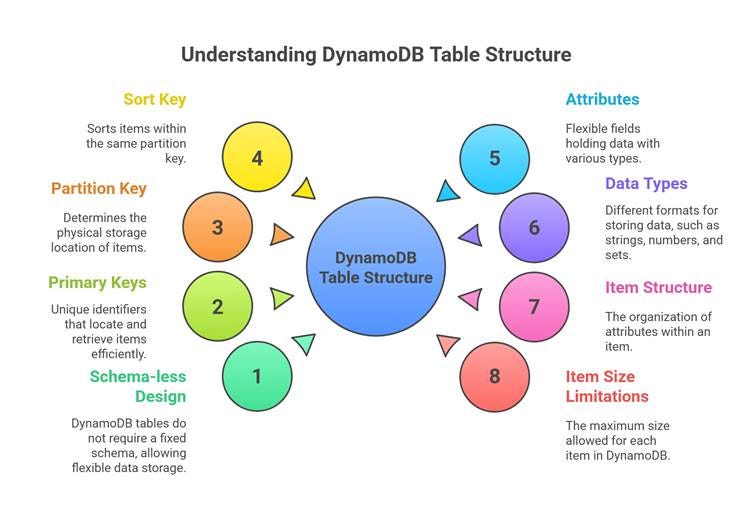
In DynamoDB, data is organized in tables - collections of items (records). Unlike SQL tables, DynamoDB tables don't have a fixed schema. Each item can have different attributes.
Key Concept: Schema-less Design
{

"TableName": "Users",

"Items": [

{

"UserID": "user123",

"Name": "John Doe",

"Email": "john@example.com",

"Age": 30

},

{

"UserID": "user456",

"Name": "Jane Smith",

"Email": "jane@example.com",

"City": "New York",

"Preferences": {

"Theme": "Dark",

"Language": "English"

}

}

]

}
Notice how the second item has additional attributes (City, Preferences) that the first doesn't have. This flexibility is a key NoSQL advantage.
Primary Keys (Partition Key and Sort Key)
Understanding Primary Keys: Your Table's GPS System
Primary keys in DynamoDB are like GPS coordinates - they uniquely identify where each item is stored and how to retrieve it efficiently. Every item must have a primary key, and no two items can have the same primary key.
Partition Key (Hash Key)
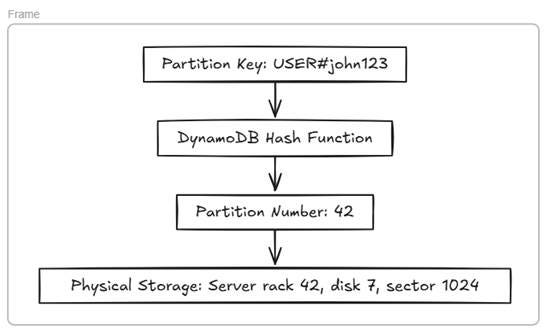
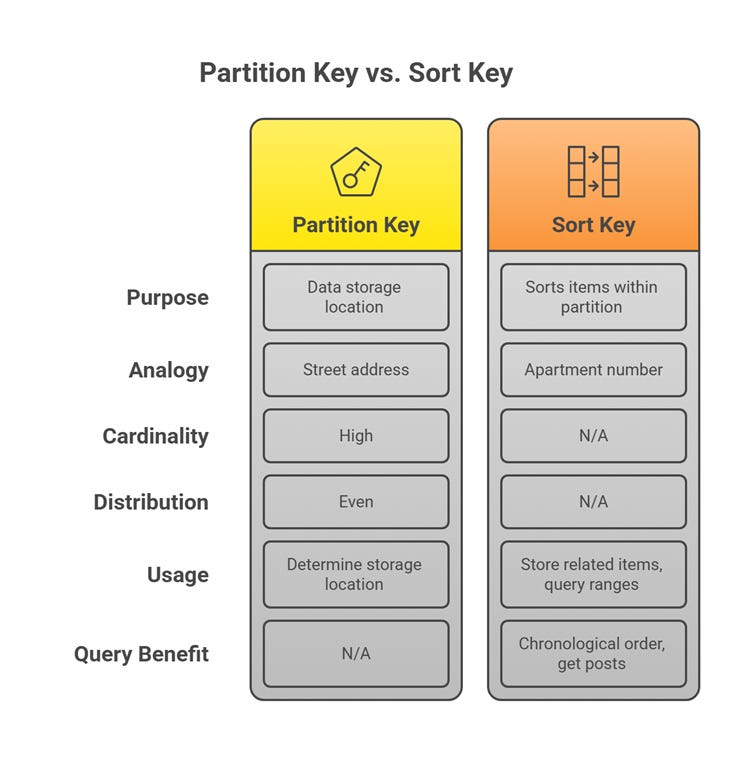
What it is: The partition key is like the street address of your data. DynamoDB uses this key to determine which physical partition (storage location) will hold your item.
How it works:
Real-World Example: User Management System
{

"UserID": "user_12345", // ← Partition Key

"Name": "Alice Johnson",

"Email": "alice@example.com",

"LastLogin": "2024-01-15T10:30:00Z"

}
Best Practices for Partition Keys:
High Cardinality: Use values that are widely distributed
✅ Good: UserID, ProductID, TransactionID
❌ Bad: Status, Country, Department (limited unique values)
Even Distribution: Avoid "hot" partitions
✅ Good: Random UUIDs, User IDs
❌ Bad: Timestamps, Sequential IDs
Sort Key (Range Key)
What it is: The sort key is like the apartment number within a building. Items with the same partition key are sorted by their sort key value.
When to use it:
When you need to store multiple related items under the same partition key
When you want to query ranges of data
When you need hierarchical data organization
Real-World Example: Social Media Posts
// User's Posts - Multiple items with same partition key, different sort keys
{

"UserID": "user_alice", // ← Partition Key

"PostTimestamp": "2024-01-15T14:30:00Z", // ← Sort Key

"PostContent": "Just finished a great workout!",

"Likes": 23,

"Comments": 5

}

{

"UserID": "user_alice", // ← Same Partition Key

"PostTimestamp": "2024-01-14T09:15:00Z", // ← Different Sort Key

"PostContent": "Morning coffee thoughts ☕",

"Likes": 17,

"Comments": 3

}
Query Benefits:
// Get all posts by Alice in chronological order
Query:
PartitionKey = "user_alice"

SortKey begins_with "2024-01"
// Get Alice's posts from last week
Query:
PartitionKey = "user_alice"

SortKey between "2024-01-08" and "2024-01-15"
Composite Primary Keys: Combining Both
Simple Primary Key (Partition Key Only):
{

"ProductID": "laptop_001", // Primary Key

"Name": "Gaming Laptop",

"Price": 1299.99

}
Composite Primary Key (Partition Key + Sort Key):
{

"CustomerID": "cust_12345", // Partition Key

"OrderDate": "2024-01-15", // Sort Key

"OrderTotal": 157.50,

"Status": "Shipped"

}
Attributes and Data Types
Understanding Attributes: The Building Blocks
In DynamoDB, an item is a collection of attributes — think of them as flexible fields holding your data. Unlike SQL databases with fixed columns, each DynamoDB item can have different attributes, giving you schema flexibility.
Example Item: User Profile in an E-commerce App
🔒 This is a premium post — an extended deep-dive continuation of on going Dynamo DB Series
👉 All paid subscriptions are managed through Gumroad.
To get full access to premium posts and newsletters, please subscribe here:Once you subscribe, you’ll be added as a complimentary subscriber in Substack so you can read all premium content directly in your inbox or in the Substack app.