

Ep #39: Understanding Data Models: From SQL to NoSQL to Graphs
Key Learnings from "Designing Data-Intensive Applications" Chapter 2

Ep #39: Breaking the complex System Design Components
By Amit Raghuvanshi | The Architect’s Notebook
🗓️ Sep 16, 2025 · Free Post ·
When building modern applications, one of the most crucial decisions you'll make is choosing the right data model. This choice affects how you think about your problem, how you write code, and how your system performs at scale. Let's explore the key insights from Chapter 2 of Martin Kleppmann's "Designing Data-Intensive Applications" and see how they apply to today's systems.
If you’d like to read my take on Chapter 1 of Designing Intensive Data Applications, click here.
What is a Data Model?
A data model is a way to organize and store data in a database so that it can be easily accessed, updated, and managed. Think of it like choosing how to organize your kitchen: you could use labeled containers (like tables), flexible bags (like documents), or a network of connected shelves (like graphs). Each method has its own benefits depending on what you’re cooking.
The choice of data model affects:
How you structure your data.
How you write queries to retrieve or update data.
How your system performs when handling large amounts of data or users.
Chapter 2 discusses three main data models: Relational, Document, and Graph, and explains why each exists and when to use them.
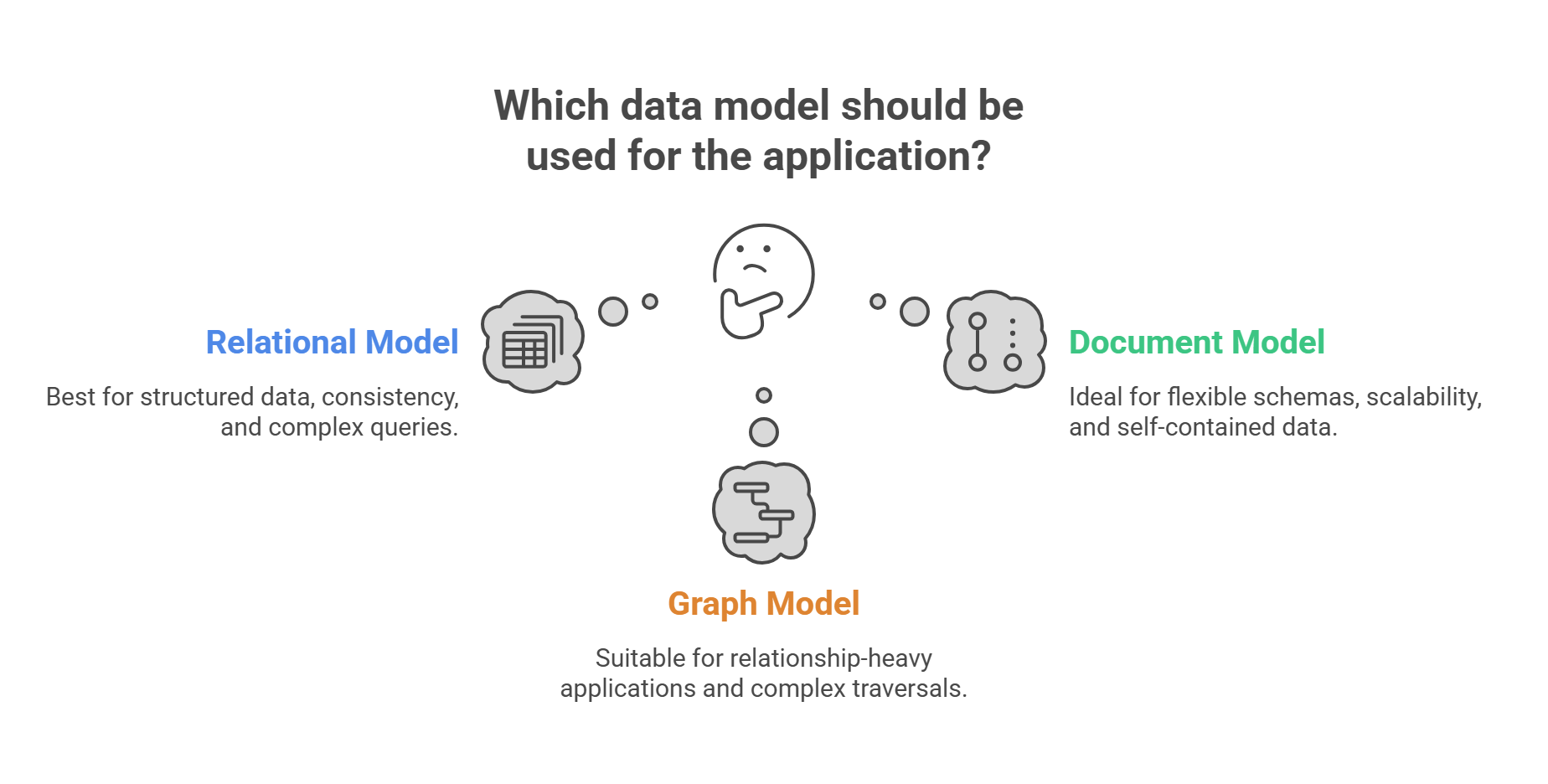
1. The Relational Model: Structured and Reliable
What is it?
The relational model organizes data into tables (called relations) with rows and columns, like a spreadsheet. Each table represents a type of entity (e.g., customers, orders), and tables can be linked using keys. You use SQL (Structured Query Language) to interact with the data.
Example: Imagine an online store like Amazon. You might have:
A Customers table with columns like id, name, and email.
An Orders table with columns like id, customer_id, and order_date.
-- Customers table
CREATE TABLE customers (
    id SERIAL PRIMARY KEY, -- Unique ID for each customer
    name VARCHAR(100),    -- Customer's name
    email VARCHAR(100)    -- Customer's email
);

-- Orders table
CREATE TABLE orders (
    id SERIAL PRIMARY KEY, -- Unique ID for each order
    customer_id INTEGER,   -- Links to the customer who made the order
    order_date TIMESTAMP   -- When the order was placed
);
How does it work?
Tables are structured: You define the columns and their data types upfront (e.g., text, numbers, dates).
Relationships: Tables are connected using keys. For example, customer_id in the Orders table links to the id in the Customers table.
SQL queries: You write SQL to combine or filter data across tables. For example, to find all orders by a customer named "Alice":
SELECT o.id, o.order_date
FROM orders o
JOIN customers c ON o.customer_id = c.id
WHERE c.name = 'Alice';
Why use it?
Consistency: Relational databases follow ACID rules (Atomicity, Consistency, Isolation, Durability), ensuring data is reliable, especially for critical systems like banking.
Powerful queries: SQL lets you combine data from multiple tables easily, great for reporting or analytics.
Mature technology: Relational databases like PostgreSQL, MySQL, and Oracle have been around for decades and are well-tested.
Real-world use cases:
Banks: To track transactions and account details.
E-commerce: To manage customers, orders, and inventory.
ERP systems: For business processes like payroll and supply chain management.
Limitations:
Rigid structure: You need to define the schema (table structure) upfront, which can slow down changes if your needs evolve.
Scaling challenges: Adding more servers (horizontal scaling) is harder than with some NoSQL databases.
Complex coding: If your app uses objects (like in Python or Java), you need extra code to map objects to tables.
2. The Document Model: Flexible and Fast
What is it?
The document model stores data as documents, which are like JSON or BSON objects. Each document is a self-contained unit that can hold complex, nested data without needing multiple tables. Document databases (like MongoDB or DynamoDB) are part of the NoSQL family.
Example: A user profile in a blog platform like Substack/Medium might look like this:
// User profile document in MongoDB
{
  "_id": "user123",
  "name": "John Doe",
  "email": "john@example.com",
  "profile": {
    "bio": "Software engineer passionate about distributed systems",
    "skills": ["JavaScript", "Python", "Go"],
    "social_links": {
      "twitter": "@johndoe",
      "github": "johndoe",
      "linkedin": "/in/johndoe"
    }
  },
  "preferences": {
    "theme": "dark",
    "notifications": {
      "email": true,
      "push": false
    }
  }
}
How does it work?
Flexible structure: Each document can have different fields, so you don’t need a fixed schema.
Self-contained data: All related data for an entity (like a user’s profile and preferences) is stored together, reducing the need for joins.
Queries: You query documents using a language specific to the database (e.g., MongoDB’s query language).
Why use it?
Flexibility: You can add new fields to documents without changing the whole database.
Scalability: Document databases are designed to scale horizontally (add more servers) easily, making them great for large-scale apps.
Matches modern apps: If your app uses JSON-like objects, saving them directly to a document database is straightforward.
Real-world use cases:
User profiles: Storing flexible user data (e.g., social media apps).
Product catalogs: Managing diverse product details (e.g., Amazon’s DynamoDB).
Content management: Storing articles or posts (e.g., Substack’s blogs).
Limitations:
No joins: If you need to combine data from multiple documents, you may need multiple queries or duplicate data, which can lead to inconsistency.
Complex relationships: Document databases struggle with many-to-many relationships (e.g., social network connections).
Weaker consistency: Some document databases prioritize speed over strict consistency, which may not work for critical data like financial transactions.
The Birth of NoSQL: Why It Happened
The NoSQL movement, including document databases, started in the late 2000s to address limitations of relational databases in certain scenarios:
Massive Scale: Companies like Google and Amazon needed to handle huge amounts of data across many servers. Relational databases were harder to scale horizontally.
Faster Development: Startups wanted to move quickly without defining rigid schemas. Document databases let developers store data as-is.
Object-Relational Mismatch: In modern apps, data is often stored as objects in code (e.g., a Python class). Converting these to tables requires extra work, but document databases store objects directly.
Example of the mismatch: In a relational database, a user with multiple addresses needs separate tables and joins:
-- Users table
CREATE TABLE users (
    id SERIAL PRIMARY KEY,
    name VARCHAR(100)
);

-- Addresses table
CREATE TABLE addresses (
    id SERIAL PRIMARY KEY,
    user_id INTEGER,
    street VARCHAR(200)
);
In a document database, you store it all together:
{
  "name": "John",
  "addresses": [
    {"street": "123 Main St"},
    {"street": "456 Oak Ave"}
  ]
}
This makes coding simpler for developers.
3. Graph Databases: All About Relationships
What is it?
Graph databases store data as nodes (entities) and edges (relationships between entities). They’re designed for applications where relationships are the most important part, like social networks or recommendation systems. Examples include Neo4j and Amazon Neptune.
Example: In a social network like LinkedIn, you might model users and their connections:
Nodes: Users (e.g., "John"), Companies (e.g., "xAI").
Edges: Relationships like "John KNOWS Alice" or "John WORKS_AT xAI".
Query Example (in Neo4j’s Cypher language): To find people John might know because they work at the same company:
MATCH (john:Person {name: "John"})-[:WORKS_AT]->(company:Company)
      <-[:WORKS_AT]-(colleague:Person)
WHERE NOT (john)-[:KNOWS]-(colleague)
RETURN colleague.name
This query finds colleagues at John’s company who he isn’t already connected to.
How does it work?
Nodes and edges: Data is stored as a network of connected points. Each node can have properties (like a user’s name), and edges define relationships (like "follows" or "likes").
Efficient relationship queries: Graph databases are optimized to traverse relationships quickly, even in large datasets.
Flexible: You can add new types of nodes or relationships without restructuring the database.
Why use it?
Relationship-focused: Perfect for apps where connections between data are central (e.g., who follows whom, who bought what).
Complex queries: Graphs make it easy to answer questions like “Who are my friends’ friends?” or “What products do people like me buy?”
Scalable for relationships: Unlike relational databases, graphs handle deeply connected data efficiently.
Real-world use cases:
Social networks: LinkedIn’s “People You May Know” or Facebook’s friend suggestions.
Recommendation systems: Netflix suggesting movies or Amazon recommending products.
Fraud detection: Spotting suspicious patterns in financial transactions.
Knowledge graphs: Powering Google’s search or Wikipedia’s linked data.
Limitations:
Complex setup: Graphs require careful design to model relationships correctly.
Not for simple data: If your data doesn’t have complex relationships, a graph database might be overkill.
Learning curve: Query languages like Cypher are less common than SQL, so teams may need training.
Comparing Data Models: When to Use What
The key to choosing a data model is understanding how your data relates to itself and how your app will use it.
Relational Databases (SQL)
Best for:
Complex relationships: Many-to-one (e.g., products to categories) or many-to-many (e.g., users to connections).
Consistent data: When you need guarantees that data is accurate (e.g., bank transactions).
Stable structure: When your data format won’t change often.
Complex queries: For reporting or analytics (e.g., “Show total sales by region”).
Examples: PostgreSQL, MySQL, Oracle.
Modern use cases: Banking systems, e-commerce transactions, business reporting.
Many-to-One Relationships: Where SQL Shines
Example: In an e-commerce system, many products belong to one category:
-- SQL handles this elegantly
SELECT p.name, c.category_name
FROM products p
JOIN categories c ON p.category_id = c.id;
Document database approach:
// You either duplicate data (inconsistency risk)
{
  "product": "iPhone 13",
  "category": "Electronics"  // Duplicated across many products
}

// Or make multiple queries (performance hit)
// Query 1: Get product
// Query 2: Get category details
Example (Many-to-Many): In a social network, you can find mutual friends easily:
SELECT u.name
FROM users u
JOIN user_connections c1 ON u.id = c1.connected_user_id
JOIN user_connections c2 ON u.id = c2.connected_user_id
WHERE c1.user_id = 'user1' AND c2.user_id = 'user2';
Document databases would struggle here because they don’t support joins.
Document Databases (NoSQL)
Best for:
Self-contained data: When each entity (e.g., a user profile) contains all its data.
Flexible schemas: When data fields might change frequently.
Scalability: When you need to handle massive data across many servers.
Fast development: When you want to store objects directly from your app.
Examples: MongoDB, DynamoDB, CouchDB.
Modern use cases: User profiles, product catalogs, real-time analytics.
Example: Storing a product with varying attributes (e.g., a phone vs. a book) is easy because documents don’t require a fixed schema.
Graph Databases
Best for:
Relationship-heavy apps: When connections between data are the focus (e.g., social networks, recommendations).
Complex traversals: When you need to explore multi-level relationships (e.g., “friends of friends”).
Examples: Neo4j, Amazon Neptune.
Modern use cases: Social networks, fraud detection, recommendation engines.
Example: Finding movie recommendations based on what similar users liked is simple in a graph database but complex in SQL.
Query Languages: Declarative vs. Imperative
Declarative Queries (SQL, Cypher)
What are they? You tell the database what you want, not how to get it.
Example (SQL): Find all users from California with over 100 orders:
SELECT u.name
FROM users u
JOIN orders o ON u.id = o.user_id
WHERE u.state = 'CA'
GROUP BY u.name
HAVING COUNT(o.id) > 100;
The database figures out the best way to execute this.
Benefits: Easier to write, maintain, and optimize. The database handles the “how.”
Imperative Queries (Code)
What are they? You write step-by-step instructions to get the data.
Example (Python): Same query as above:
california_users = []
for user in users:
    if user.state == 'CA':
        order_count = 0
        for order in orders:
            if order.user_id == user.id:
                order_count += 1
        if order_count > 100:
            california_users.append(user.name)
Drawbacks: More code, harder to maintain, and less optimized for large datasets.
MapReduce (Distributed Queries)
For very large datasets, document databases like MongoDB use MapReduce to process data across multiple servers:
Map: Break data into key-value pairs (e.g., group orders by customer).
Reduce: Aggregate the results (e.g., sum order amounts).
Example:
db.orders.mapReduce(
  function() { emit(this.customer_id, this.amount); }, // Map: emit customer ID and order amount
  function(key, values) { return Array.sum(values); }, // Reduce: sum amounts for each customer
  { out: "customer_totals" }
);
Modern tools like Apache Spark combine SQL-like queries with distributed processing for scalability.
Common Mistakes to Avoid
Choosing NoSQL Too Early:
Mistake: Picking MongoDB because it’s “cool” without understanding your needs.
Fix: Start with a relational database like PostgreSQL, which is versatile and supports JSON for flexibility.
Ignoring Consistency:
Mistake: Using a database with weak consistency (e.g., eventual consistency) for critical data like bank balances.
Fix: Use ACID-compliant databases for critical data and relaxed consistency for less critical features (e.g., user notifications).
Misusing Schema-less Design:
Mistake: Storing completely different data in the same document collection, making queries hard.
Fix: Even in document databases, keep some structure for consistency (e.g., all user documents should have a name field).
Overusing Graph Databases:
Mistake: Using a graph database for simple data like a list of products.
Fix: Use graphs only when relationships are central to your app.
Polyglot Persistence: Using Multiple Databases
Modern apps often use multiple databases to handle different needs:
Netflix: Uses Cassandra (NoSQL) for viewing data, MySQL (relational) for billing, and Neo4j (graph) for recommendations.
Uber: Uses PostgreSQL for trip data, Redis for caching, and Neo4j for mapping routes.
LinkedIn: Uses MySQL for user data, Kafka for messaging, and Neo4j for connections.
This approach, called polyglot persistence, lets you pick the best tool for each job.
Trends and Future Directions
Multi-Model Databases: Databases like Azure CosmosDB or ArangoDB support relational, document, and graph models in one system, reducing complexity.
NewSQL: Databases like Google Spanner or CockroachDB offer SQL with global scalability and strong consistency.
Serverless Databases: Platforms like PlanetScale or Supabase manage databases for you, so you focus on building the app.
Key Takeaways
No One-Size-Fits-All: Each data model (relational, document, graph) is best for specific problems. Understand your data and access patterns first.
Focus on Relationships: Choose a model based on how your data is connected (e.g., tables for many-to-many, documents for self-contained data, graphs for complex relationships).
Start Simple: Use a relational database like PostgreSQL unless you have a clear reason to use NoSQL or graphs.
Declarative is Better: SQL and Cypher are easier to maintain than writing step-by-step code.
Evolve as Needed: You can switch or combine databases as your app grows.
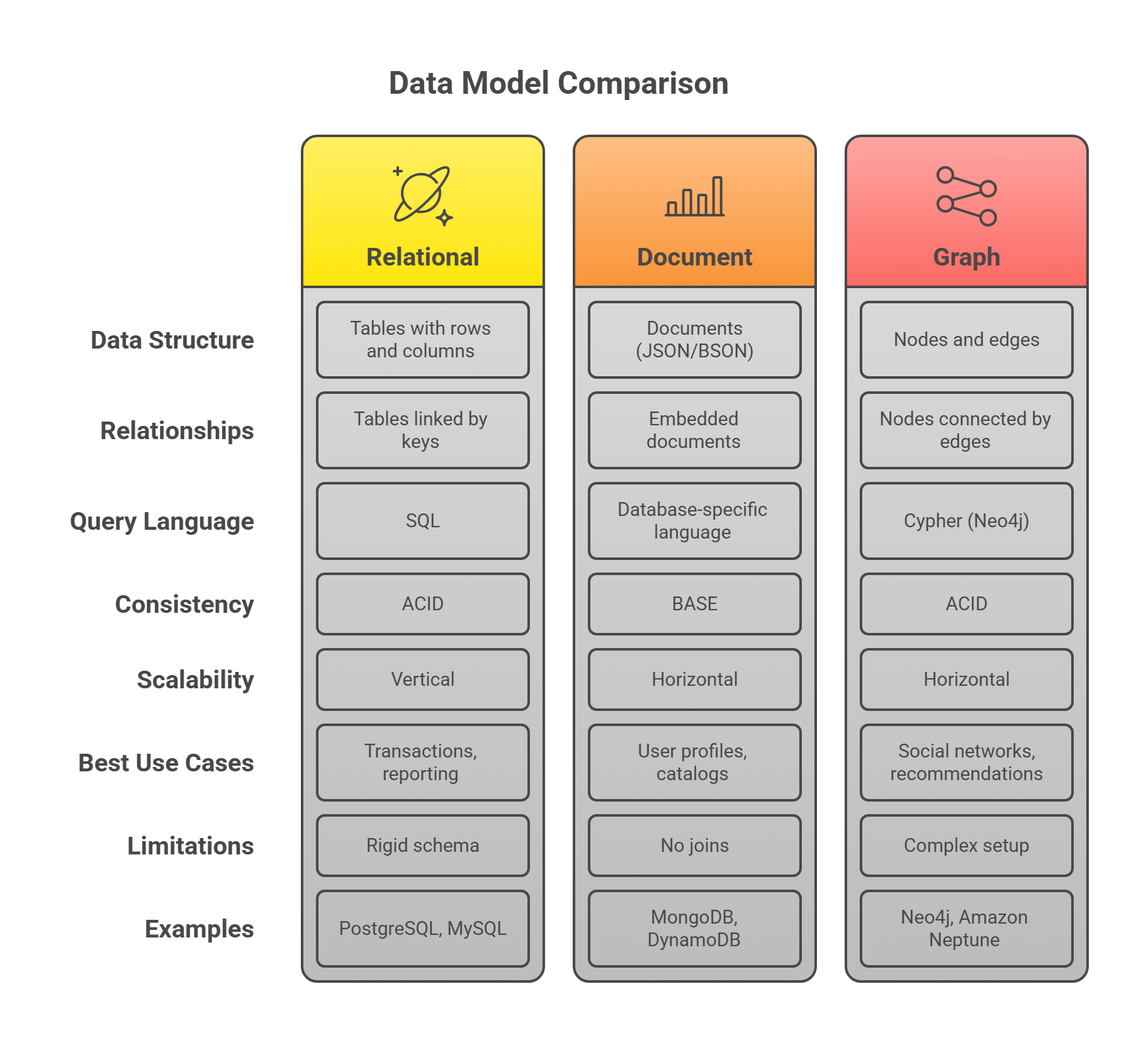
By understanding these data models and their trade-offs, you can make smart decisions to build systems that are efficient, scalable, and maintainable.
The database landscape continues to evolve, but the fundamental principles from Chapter 2 remain relevant. Understanding these concepts will help you make better architectural decisions and build systems that can grow with your needs.
Remember: the best database is the one that solves your specific problems efficiently and maintainably. Focus on understanding your data and access patterns first, then choose the tool that fits best.