

Ep #91: Why Your 1Gbps API Feels Like 3G (Part 1): The Mechanics of TCP Flow Control
Why adding more servers won't fix latency, and how the "Zero Window" silently kills your throughput.

Breaking the complex System Design Components
By Amit Raghuvanshi | The Architect’s Notebook
🗓️ Mar 17, 2026 · Deep Dive ·
The “Invisible” Bottleneck
You have optimized your SQL queries. You have added Redis caching. You have rewritten your Node.js loop to be non-blocking. Your application logs say the request took 15ms to process.
But the client says it took 500ms.
Where did the other 485ms go?
Most developers blame “the network” and leave it at that. They assume the internet is just slow. But often, the problem isn’t the speed of the network; it’s the mechanics of the protocol you are standing on.
HTTP is a lie. It pretends to be a simple “Request-Response” protocol. But HTTP doesn’t actually send data. TCP (Transmission Control Protocol) sends data.
And TCP is a control freak.
TCP doesn’t care about your JSON. It cares about Reliability and Fairness. If TCP decides that the receiver is overwhelmed or the network is congested, it will literally stop sending your data, even if your application is screaming to go faster.
Today, we are going to open the hood of the Transport Layer. We will calculate why your 1MB JSON response takes longer than you think, and how a blocked Node.js event loop can trigger a network-level freeze known as the “Zero Window.”
Part 1: The Illusion of the Pipe
We tend to think of a TCP connection as a tube. You pour bytes in one end, and they come out the other.
In reality, TCP is not a continuous stream. It is a conversation of Packets (Segments). And it is a conversation that requires constant affirmation.
Sender: “Here is 1460 bytes.”
Receiver: “Got it. Send more.”
Sender: “Here is the next 1460 bytes.”
If the Receiver stops saying “Got it,” the Sender stops sending. This mechanism is governed by two critical windows:
The Receive Window (rwnd): Protecting the Receiver.
The Congestion Window (cwnd): Protecting the Network.
Your HTTP request lives and dies by these two variables.
Part 2: Flow Control (The Receiver is Full)
Flow Control is purely about the Receiver telling the Sender: “Whoa, slow down, I can’t process data that fast.”
The OS Kernel Buffer vs. The Application
When a packet arrives at your server, it doesn’t go straight to your application. It lands in the OS Kernel’s TCP Receive Buffer.
Your application (Nginx, Node.js, Go) then read()s data from that buffer into its own memory.
Healthy State: The App reads faster than the Network sends. The Buffer stays empty.
Unhealthy State: The App is slow (blocked event loop, Garbage Collection). The Network sends data faster than the App can read. The Buffer fills up.
The Sliding Window Mechanism
To prevent the buffer from overflowing (which would mean dropping packets), the Receiver sends a header value in every ACK packet called the Window Size.
This tells the Sender: “I have X bytes of free space left in my buffer. Do not send more than X.”
If your Node.js application is stuck doing a heavy CPU task (calculating a Fibonacci sequence or parsing a massive JSON), it stops reading from the network socket.
The Kernel Buffer fills up.
The Window Size advertised to the Sender drops: Window: 4096... Window: 1024...
TCP Zero Window: The Receiver sends
Window: 0.The Sender stops transmission immediately. The HTTP request hangs. The client is waiting for the rest of the JSON response, but the server’s OS refuses to accept it.
Visualizing the Zero Window
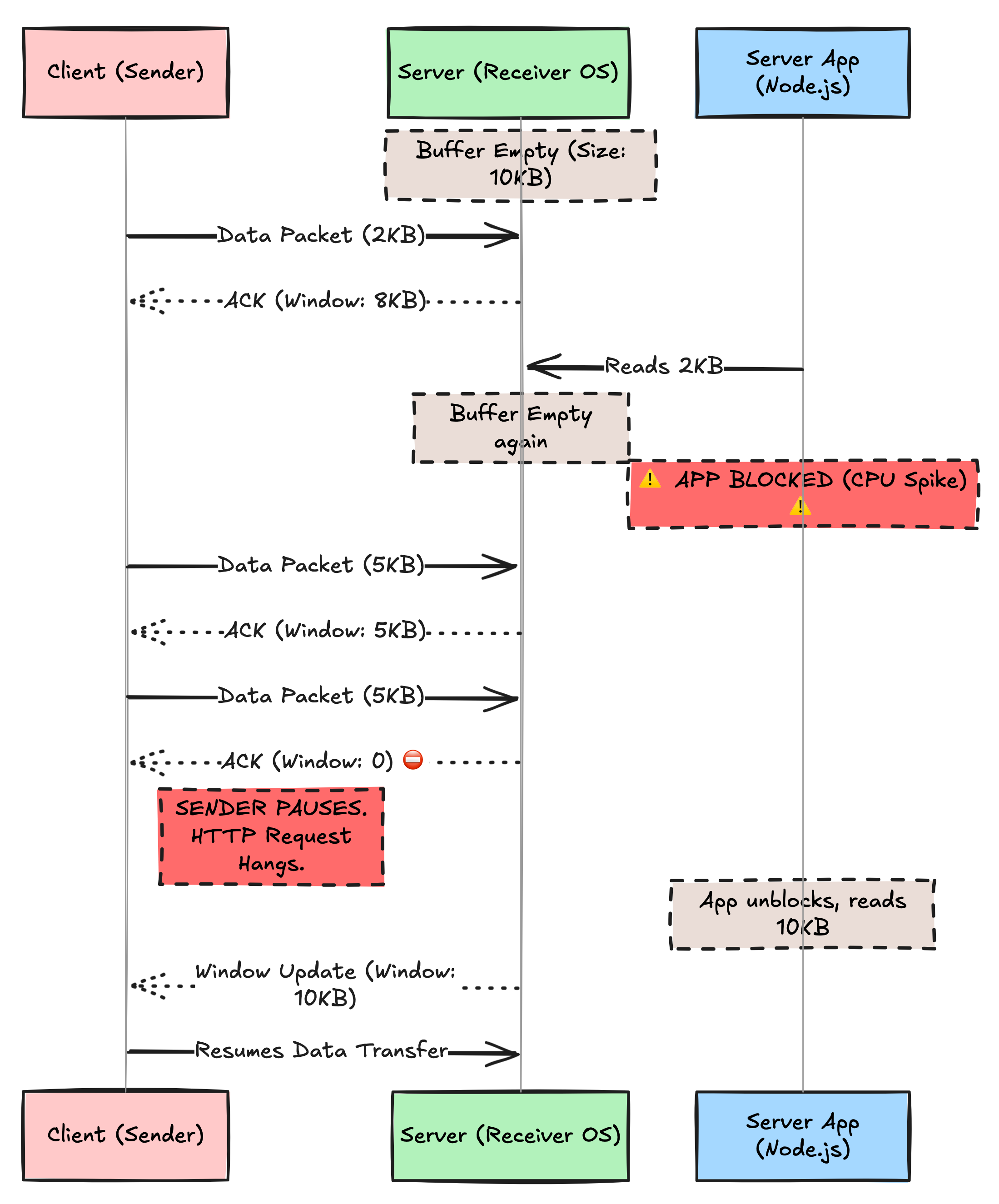
The Impact on HTTP: If you see “High Time to First Byte” (TTFB) or random stalls in large uploads, check your server metrics. If your CPU is spiking, you are likely triggering TCP Flow Control, causing the network layer to throttle the connection.
🔒 Subscribe to read about Congestion Control & BDP
We’ve seen how a slow App kills the connection. Now let’s see how a slow Network kills it.
Why does a new connection start slow and get faster? Why does a 1GB file transfer sometimes get stuck at 600KB/s on a 1Gbps line?
In the rest of this deep dive, we will cover:
The Slow Start Tax: Why every new HTTPS connection pays a “latency penalty” of 3-4 round trips.
The Bandwidth-Delay Product (BDP): The physics equation that proves why high latency destroys throughput (
Throughput <= Window / RTT).
Head-of-Line Blocking: Why HTTP/2 fixed one problem but created a worse one at the TCP layer.