

Ep #72: Database Anti-Patterns (Part 2): The Silent Killers of Data Integrity
God Tables, Generic Foreign Keys, and the Soft Delete trap.

Breaking the complex System Design Components
By Amit Raghuvanshi | The Architect’s Notebook
🗓️ Jan 8, 2025 · Deep Dive ·
The Rot from Within
In Part 1, we talked about schema flexibility errors. Those usually hurt you immediately (slow queries, hard-to-write SQL). Today, in Part 2, we are talking about The Silent Killers.
These are patterns that work perfectly fine in development. They work fine with 10,000 users. But as you scale, they act like rust in the machinery. They bloat your I/O, corrupt your data references, and make simple logic exponentially complex.
Anti-Pattern 3: The “God Table” (The 100-Column User)
The Scenario: The User is the center of your application. Over 3 years, every feature team adds “just one column” to the User table.
Marketing adds
last_login_ip.Sales adds
hubspot_score.Product adds
theme_preference.Security adds
failed_login_attempts.
The Schema: A single table users with 125 columns.
The Trap: You have created a Locking Hotspot and an I/O Black Hole.
Why it Creates Doomed Systems:
1. I/O Bloat: The Page Size Problem
Databases read data in “Pages” (usually 8kb blocks). Even if you only ask for one column, the database often loads the whole page containing the row. If your user row is huge (6kb because of bio text, settings JSON, and 100 columns), you can only fit 1 user per page.
To scan 100 users, the database has to load more pages from the disk. Your cache effectiveness drops.
-- You just want the user’s email to send a newsletter
SELECT email FROM users WHERE id = 12345;

-- But the database loads the ENTIRE 6KB row into memory:
-- email, password_hash, first_name, last_name, bio, avatar_url,
-- last_login_ip, last_login_at, hubspot_score, salesforce_id,
-- stripe_customer_id, theme_preference, language, ... (95 more columns)
You are burning 99% of your I/O bandwidth loading data you don’t need. This trashes your RAM cache, causing disk reads to spike.
2. Transactional Locking: The Bottleneck
Even though Marketing (updating hubspot_score) and Security (updating failed_login_attempts) are touching different columns, they are locking the Same Row. At scale, this lock contention causes “Stop-the-world” pauses. Your login endpoint gets slow because a background job is updating marketing scores.
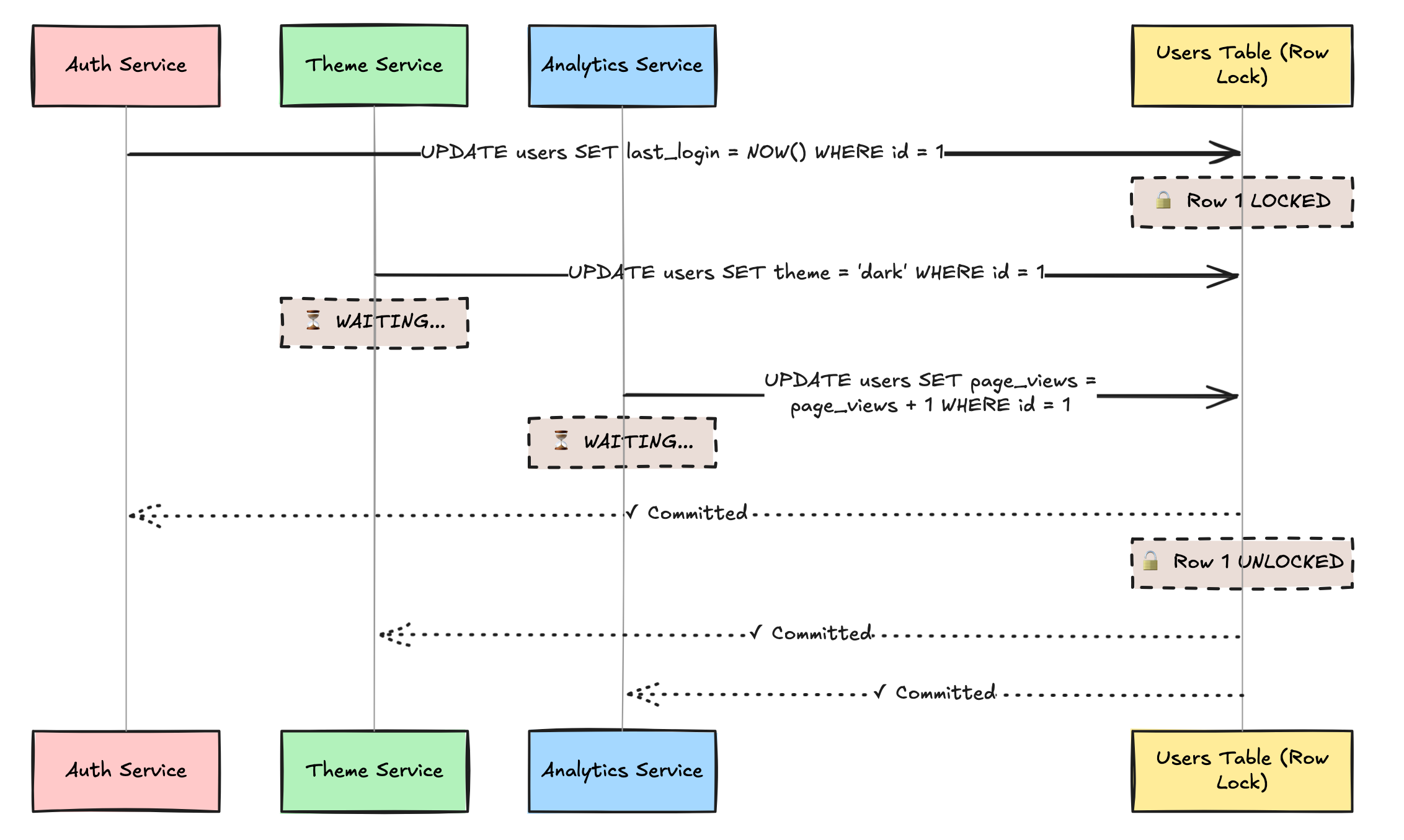
At 1000 requests/second:
Average lock time: 5ms per update
3 services updating the same user row
Lock contention causes serial processing instead of parallel
Latency increases from 5ms to 15ms+
Users see random slowdowns: “Why is login sometimes fast and sometimes slow?”
3. The Mental Model Collapse
No developer knows what all 125 columns do. You end up with is_active, is_verified, has_confirmed_email—and nobody knows which one actually lets the user log in.
-- Which one actually controls login?
is_active = true
is_verified = true
email_verified = true
account_status = ‘active’
suspended_until IS NULL
deleted_at IS NULL
locked_until IS NULL

-- Developer A checks: is_active
-- Developer B checks: is_verified AND email_verified
-- Developer C checks: account_status = ‘active’
-- Production: users can’t login, but nobody knows why
4. The Migration Nightmare
You need to add a new column gdpr_consent_at. With 100 million users, this is a 30-minute table lock in MySQL.
ALTER TABLE users ADD COLUMN gdpr_consent_at TIMESTAMP;
-- 🔒 TABLE LOCKED FOR 30 MINUTES
-- 💀 All user operations: down
Anti-Pattern 4: Polymorphic Associations (The “Generic” Foreign Key)
The Scenario: You have a Comments table. Users can comment on a Post, a Video, or a Product. You think: “I’ll make a generic link so I don’t need 3 tables.”
The Schema:
TABLE comments {
  id: integer
  body: text
  parent_id: integer    -- Could be a Post ID, Video ID, or Product ID
  parent_type: varchar  -- ‘Post’, ‘Video’, or ‘Product’
}
The Trap: This is the standard implementation in Rails (ActiveRecord) and Laravel (Eloquent). It is convenient for ORMs, but it is poison for SQL integrity.
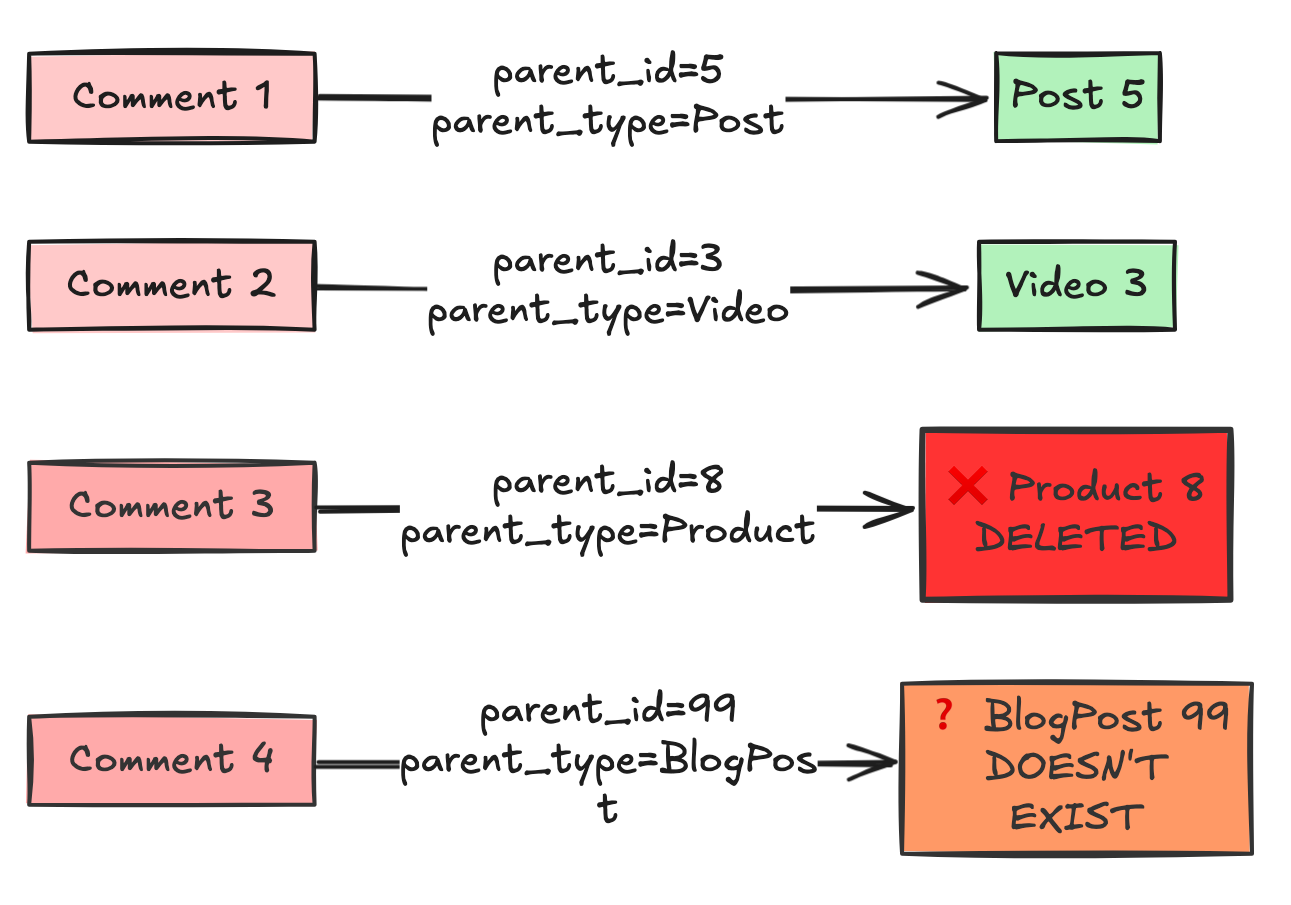
Why it Creates Doomed Systems:
1. No Foreign Keys = No Referential Integrity
You cannot define a Foreign Key constraint on parent_id. A Foreign Key must point to one specific table. This means the database cannot protect you.
-- Day 1: Everything looks fine
INSERT INTO posts (id, title) VALUES (5, ‘My Post’);
INSERT INTO comments (body, parent_id, parent_type)
VALUES (’Great post!’, 5, ‘Post’);

-- Day 30: Marketing deletes old posts
DELETE FROM posts WHERE id = 5;
-- ✓ Post deleted successfully

-- Day 31: User views comments
SELECT * FROM comments WHERE parent_id = 5 AND parent_type = ‘Post’;
-- Returns: “Great post!”
-- But Post #5 doesn’t exist anymore! 💀

-- Day 45: A new Video is created with ID 5.

The Bug: The old comments from the Post now magically appear on the new Video.
You now have Orphaned Data and Zombie Data.
This means you can delete a
Post, but forget to delete theComments. You now have Orphaned Data.Your database is now inconsistent. Queries will start failing with Null Pointer Exceptions in your application code.
More Horror Stories:
-- Someone typos the type:
INSERT INTO comments (body, parent_id, parent_type)
VALUES (’Nice!’, 10, ‘Prodcut’);  -- Typo: “Prodcut”

-- Someone uses the wrong ID space:
INSERT INTO comments (body, parent_id, parent_type)
VALUES (’Cool!’, 999, ‘Video’);
-- But Video ID 999 is actually a Post ID

-- Someone changes the entity type name:
UPDATE products SET type_name = ‘ProductItem’;
-- Now all comments with parent_type=’Product’ break
The database can’t stop any of this. Your data integrity is dependent on perfect application code.
2. Performance: The Impossible Join
You cannot easily join data.
Query: “Get all comments and the name of the thing they commented on.”
You can’t do it in one query. You have to fetch the comments, check the
type, and then run separate queries for Posts, Videos, and Products. This is the N+1 Query Problem by design.
3. The Index Disaster
-- You want to find all comments on Post #5:
SELECT * FROM comments
WHERE parent_id = 5 AND parent_type = ‘Post’;

-- You create an index:
CREATE INDEX idx_comments_parent ON comments(parent_id);

-- But the index is USELESS!
-- Because parent_id=5 could be:
-- - Post #5
-- - Video #5
-- - Product #5
-- The database has to read ALL rows with parent_id=5,
-- then filter by type in memory.
You need a composite index:
CREATE INDEX idx_comments_parent ON comments(parent_type, parent_id);But now every query MUST include parent_type first, or the index won’t be used. Your query optimizer is constantly confused.
Anti-Pattern 5: The Boolean “Soft Delete” Trap
The Scenario: You never want to lose data. When a user deletes an item, you don’t run DELETE. You just hide it.
The Schema:
TABLE items {
  id: integer
  name: varchar
  is_deleted: boolean DEFAULT false
}
The Trap: It seems safe, but you have complicated every single query in your application forever.
Why it Creates Doomed Systems:
Unique Constraints Break:
User creates a folder named “Invoices”.
User deletes “Invoices” (
is_deleted = true).User tries to create a new folder named “Invoices”.
Database Error: Unique constraint violation on
name. The database sees the old row.Now you have to make your unique index conditional:
CREATE UNIQUE INDEX ... WHERE is_deleted = false.
Query Performance:
You have to remember to add
AND is_deleted = falseto every SELECT, UPDATE, and JOIN.If you forget it in one place (e.g., an analytics report), you are reporting false numbers.
Your indexes get bloated with dead data that you rarely read.
The Foreign Key Cascade Problem
You’ve lost the database’s referential integrity guarantees. You’re now managing cascading deletes manually in application code.
The Storage Cost Explosion
-- Table size after 3 years:
-- 90% of your storage is deleted data
-- 90% of your backup time is deleted data
-- 90% of your replication bandwidth is deleted data
Now you have to use conditional indexes. And if you forget to add AND is_deleted = false to one report query, your CEO thinks you have double the revenue you actually have.
🔒 Subscribe to read the Solution & Architecture Patterns
We have identified the Silent Killers. These patterns are insidious because they don’t break immediately. They break when you try to scale, or when you try to generate accurate reports.
In the rest of this deep dive, we cover:
Vertical Partitioning: How to split the God Table into
users,user_profiles, anduser_statsto reduce locking by 90%.Exclusive Arcs: The correct SQL pattern to handle “Polymorphic” relationships without losing Foreign Keys.
The Archive Table Pattern: Why
is_deletedis a lie, and how to implement a proper “Trash Can” system using transaction-based archiving.